NerdMiner v2 review — solo Bitcoin miner for the desk
Who is this for? Bitcoin enthusiasts and hobbyists who want to understand how mining works — not for anyone who wants to seriously mine Bitcoin. The chance of finding a block is astronomically small; the value is in the learning.
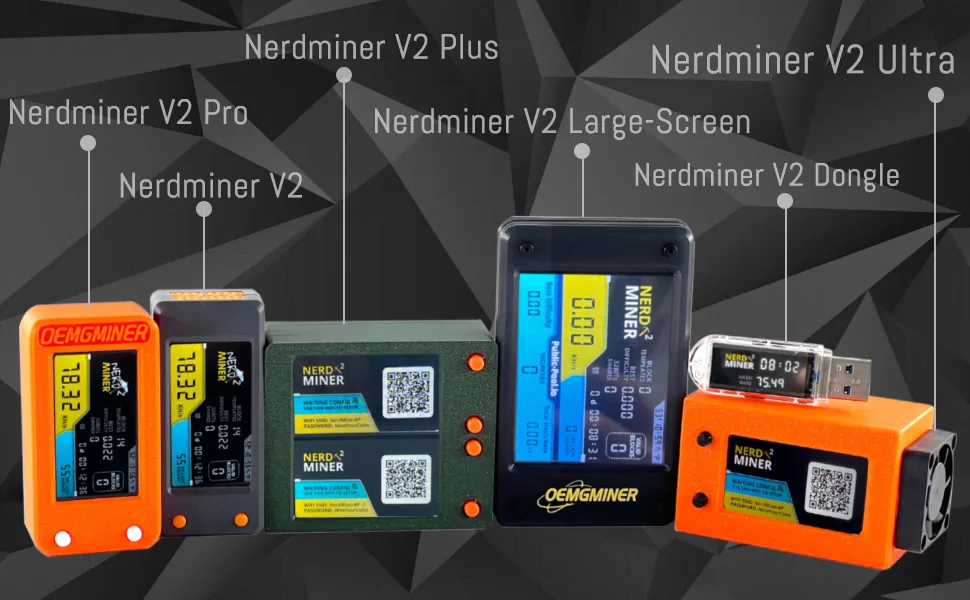
NerdMiner v2 review
Who is this for? Bitcoin enthusiasts and hobbyists who want to understand how mining works — not for anyone who wants to seriously mine Bitcoin. The chance of finding a block is astronomically small; the value is in the learning.
The NerdMiner is an ESP32 microcontroller with a small screen that mines on the Bitcoin network. The chance of finding a block is astronomically small. That’s also not the point.
What is the NerdMiner?
The NerdMiner v2 runs open-source firmware on an ESP32 chip. It connects via Wi-Fi to a Bitcoin solo mining pool, usually ckpool.org by default, and tries to find blocks. Every second it calculates hash values — the hash rate is in the rough range of tens of kH/s.
For comparison: the total Bitcoin network runs at hundreds of EH/s (exahashes per second) — more than 1017 hashes per second. The NerdMiner does tens of thousands per second. The chance of finding a block is comparable to winning the lottery while being struck by lightning simultaneously.
The community knows this. The NerdMiner is not bought as a profitable miner.
Specifications
| Property | Value |
|---|---|
| Chip | ESP32-S3 |
| Hash rate | On the order of tens of kH/s |
| Display | 1.9” TFT colour screen |
| Connection | Wi-Fi (2.4 GHz) |
| Power | USB-C (5V) |
| Firmware | Open-source (NerdMiner_v2 on GitHub) |
| Power consumption | ~1–2W |
| Price | Varies by builder or kit |
What you see on screen
The screen shows live: current hash rate, total hashes, uptime, pool connection status, and number of shares found. In the community there are people who run the NerdMiner for months without ever finding a block — and are perfectly fine with that.
Why people buy it
Educational: You see how mining works. The firmware is readable, the pool communication is visible, the statistics are real-time. For someone understanding how Bitcoin works, this is more concrete than an explanation.
Conversation starter: A small device on your desk mining Bitcoin attracts attention. Easier to explain than an abstract wallet.
Collection/hobby: The ESP32 community builds variants with different screens, 3D-printed enclosures, and custom firmware. There are dozens of variants on GitHub.
Lottery ticket: In the community, a found block is seen as a historic event. There are people who seriously try with multiple devices — fully understanding that the odds are vanishingly small.
Updating firmware
The NerdMiner runs actively maintained open-source firmware. Updates are straightforward via the web flasher at nerdminer.io or through Arduino IDE. The firmware regularly adds features: new pool support, UI improvements, statistics.
Caveats
This is not an investment. Electricity costs at roughly 1 to 2 watts are theoretically never offset by mining returns. That is the trade-off you make consciously.
No hardware wallet function. The NerdMiner doesn’t store Bitcoin and has no secure element. Use a Trezor Safe 3 for storing crypto.
Pros and cons
Pros
- Live display shows real hash rate, shares, and pool connection — makes Bitcoin mining mechanics tangible and visible
- Open-source firmware (NerdMiner_v2) actively maintained with regular updates via web flasher or Arduino IDE
- Power consumption of around 1 to 2 watts is negligible in daily use
- ESP32 community has dozens of hardware variants with custom enclosures and screens
- Good conversation starter; lively hobbyist community with its own variants and 3D-printed enclosures
Cons
- Not serious mining: tens of thousands of hashes per second versus an astronomical network hash rate
- Electricity costs will theoretically never be offset by mining returns
- No hardware wallet function — does not store Bitcoin, has no secure element
- The chance of finding a block is comparable to winning the lottery while being struck by lightning simultaneously
Conclusion
The NerdMiner does what it promises: an ESP32 doing Bitcoin mining, with a readable screen and actively maintained firmware. You don’t buy it to get rich but to understand how mining works, or simply because it’s a fun device.
Getting started
1. Flash the firmware
Go to nerdminer.io — the browser-based flasher works via Chrome or Edge with no extra software. Connect the NerdMiner via USB-C and follow the on-screen steps.
2. Set up Wi-Fi
After flashing, the device asks for your Wi-Fi network and password. Enter them via the screen or via the captive portal the NerdMiner briefly opens.
3. Enter your Bitcoin address
Enter your own Bitcoin address as the payout recipient in case you ever find a block. Use your Trezor address or another address you control. Leave the default ckpool.org as the pool.
4. Let it run
Set it on the desk and check the hash rate on the screen. Expect around 50–80 kH/s — that is normal.
Next step
Got the NerdMiner running?
- Trezor Safe 3 review — for securely storing Bitcoin and crypto
Similar options
- Network security for crypto — securing the broader crypto environment
Want to go further?
- Firmware on GitHub:
github.com/BitMaker-hub/NerdMiner_v2— build your own variants, follow issues, community updates